

How Kiln Prompt Optimizer Works
We're really excited about this one. Kiln can now automatically find the ideal prompt for your task, guided by your own evals. It's easy to use, and the performance gains blow away manual prompt optimization — even beating fine-tuning in many cases. And once you have an optimized prompt, deploying it is simple.
The idea is pretty simple:
- You define what you care about improving using Kiln Evals. Our recently launched Kiln Eval Builder make it easy to create evals (<5 mins per eval!)
- Run the Kiln Prompt Optimizer in a few clicks. It will run thousands of evals across hundreds of prompt iterations to find what works best for your task.
Technically, it's a process called reflective prompt evolution. Our optimizer is a version of the powerful GEPA algorithm, with additional optimizations for speed, accuracy and ease of use.
Conceptually, it's not dissimilar to how a human optimizes a prompt: running examples, finding issues, iterating on the prompt, then re-validating. However unlike a human, it works rapidly, tirelessly, and scientifically — running thousands of validations, making hundreds of iterations, never missing a test case.
We think it's the best optimization technique for most teams
Automated prompt optimization is our new go-to recommendation for teams looking to improve their task-specific performance. Let's compare it to fine-tuning:
| Fine Tuning | Kiln Prompt Optimization | |
|---|---|---|
| Effort | High | Low |
| Optimization Target | Supervised Training Data | Existing Evals |
| Training Time | 20m to 1 day | <1 hour |
| Interpretability | Can't Interpret: changes are in model weights | Easy to Interpret: read your new prompt |
| Deployment Effort | High: deploy a custom model | Low: just update your prompt |
| Overfitting | High risk: often overfits, requires tuning params like dropout to avoid | Less likely: evolutionary algorithm avoids overfitting more easily |
| Quality | High | High |
It's easier to run, easier to validate, easier to deploy, and often is just as good as fine-tuning.
This feature consumes millions of tokens each run. Due to the high cost of running the optimizer, the prompt optimizer is a paid feature. However, we'd love some feedback so we're giving away free credits. If interested, email us at [email protected], explain your use case, and we'll set you up.
Read the docs on the Kiln Prompt Optimizer →
We'll Help You Find the Best Solution For Your Task
New Optimizer Screen
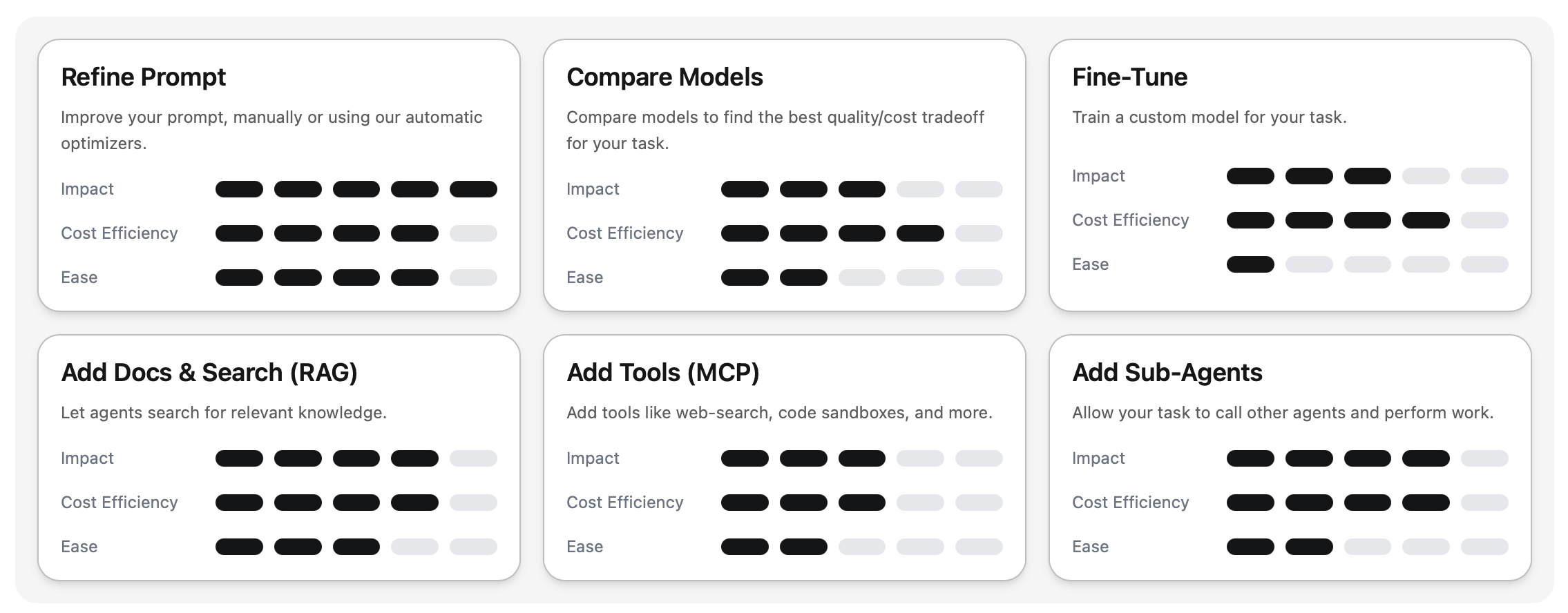
While automatic prompt optimization is the best solution for many teams, there's no one-size-fits-all AI solution. Each task and team is different, so we're introducing our new Optimizer Screen to help you find the right solution to your AI problem, be it RAG, agents, tools, model-selection, fine-tuning or prompting:
Download the new Kiln release to get both Kiln Prompt Optimizer and the new Optimize Screen:
New Blog: The Requirements Layer Your AI System is Missing
Sam on our team has been building AI products for years (she was at Apple Photos Intelligence before joining Kiln). She has created a guide for how to solve the kinds of problems that teams face when building AI products: eval scores don't match user complaints, teams arguing about whether outputs are "good enough," and what to do when improvements in one area mysteriously break another.
Read the Blog Post: The Requirements Layer Your AI System is Missing →
Questions? You can ask Sam directly on our Discord!
Bonus: MCP-as-Task
Want to use Kiln for evals, data-generation or optimization, but already have your agent implemented in another platform? Well, now you can!
Connect any existing agent to Kiln directly over MCP, and you can use all of Kiln's tooling with your existing agents, no matter which platform, framework, or language they are written in.
Feedback and suggestions are very welcome! Is the prompt optimizer helpful? What else would improve Kiln? Drop us a note on Discord.
Thanks for being part of the Kiln Community!
Steve